The Uncomfortable Truth About Permissions
Why Google's extension permission system is broken — and how BetterFloat adapts.
Permissions are the fundamental building block to building trust between users and developers. But the current system is broken to a point that it does the exact opposite.
Our 2 year journey
When I started with BetterFloat, Manifest Version 3 (MV3) was the new hot thing. Its reworked permission system was supposed to provide more security and privacy for users by limiting what extensions can do.
BetterFloat was fundamentally built as an open-source project with top-notch security and privacy in mind. Requesting the bare-minimum set of permissions we needed at the time seemed like a no-brainer. But this was a mistake.
We were now limited in our development by the boundaries of the requested permissions. For every new feature, we had to carefully evaluate if it required additional permissions.
You might ask what the big deal is? Well, every new permission request completely disables the extension for all users until they manually approve the new permissions.
This is a huge problem because it completely breaks the user experience and loses us a good chunk of our user base. Users are afraid of new permissions and they are completely right to be afraid.
But we just wanted to make the extension better for everyone? Well, we did. But at the cost of our user base.
The current state of permissions
So let's be honest: browser-extension permissions are a minefield – for developers and for users. If we ask for the bare-minimum set of permissions we need today, we limit ourselves in future development. You get annoyed, we lose momentum — everyone is sad.
The alternative is to request a broad, catch-all list up-front so we never have to bother you again – but that feels like handing the keys to your house to a stranger you just met. Exactly the kind of trade-off that gives extensions a bad name. Nevertheless, this has become the most common approach. You just can't afford to lose users.
At BetterFloat we try to find the middle road: ask for only the permissions we genuinely need to deliver the features you installed the extension for, and explain exactly why each one is required. No dark patterns, no silent scope creep.
But this means we incrementally have to ask for new permissions to match our new features. And this is where we are at today.
So what changed?
Well, we are at the point where we have to ask for more permissions to support new markets. At the same time, we reworked our structure to make this (hopefully) the last permissions update for a long time.
So let's take a look at what we changed.
Our Permission Set
storage
We save your extension settings (e.g. enabled marketplaces, UI preferences) locally using Chrome's storage API. This keeps everything synced across your devices while giving you 100% data privacy.
scripting & active Tab
BetterFloat injects small content scripts into marketplace pages to read live price data and render overlays. The scripting permission lets us dynamically execute those scripts only on our supported marketplaces.
omnibox
Our newest feature: Typing a market name in the address bar opens BetterFloat's quick-search for items and collections. For that neat shortcut the browser demands the omnibox permission.
host permissions
We heard your feedback and request permissions for all sites individually. You are free to remove any site from the list at any time, but keep in mind that this may break features.
Clarifying BetterFloat's permission set is an important aspect of our transparency. Our more technical users, can have a look at our Github repository to see exactly how we use each permission.
How to Grant New Permissions
If you're seeing a permission prompt or BetterFloat has been disabled, here's how to get back up and running:
Option 1: Permission Prompt
If you see a permission dialog when updating BetterFloat, simply click "Allow" or "Grant Permissions" to continue using the extension with new features.
Option 2: Manually Enable
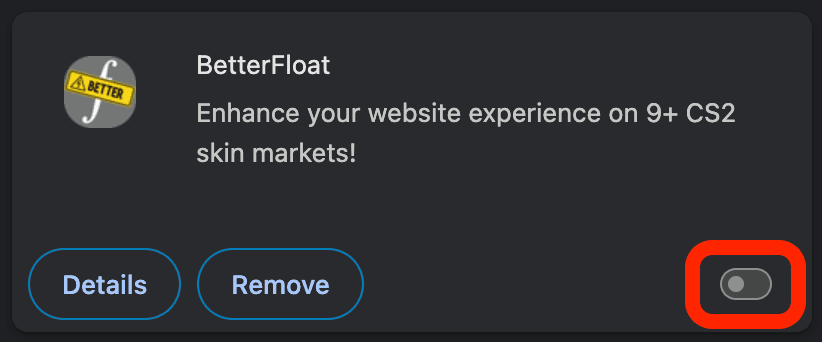
Navigate to (or your browser's extension page) and find BetterFloat in the list. If disabled, toggle the switch to re-enable it.
Grant any requested permissions in the popup.
Having trouble? Drop by our Discord or open an issue on GitHub – we're always happy to help troubleshoot.
